Manual›Jobs
How do I get AI to see my screen and help me?
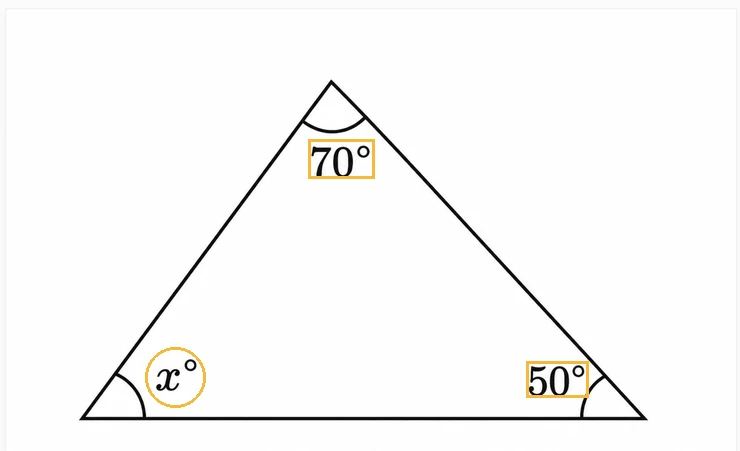
Press Command+Shift+Space (Ctrl+Shift+Space on Windows and Linux) from anywhere, or click the orb, and a compact panel opens over whatever you're doing. Ask your question with the screen attached, and Irene reads what's there and draws its answer on it, boxing the two known angles and circling the unknown one in the diagram below. The two requests took about a minute in all.
A real run: a geometry question, then a song
A run on our machine, 13 October 2026, on Claude Sonnet 5.5.
This was the request, typed over the diagram:
They explained me With diagrammatic marks and all how To solve this question.
The panel had the screen: a triangle open in a browser, with 70° at the top, 50° at the bottom right and x° at the bottom left.
What the main agent did
- Read the diagram it had been given. It found three angles: 70° at the top, 50° at the bottom right and x° at the bottom left.
- Marked the angles it was talking about. Its reply carried drawing instructions as well as words: a box around 70°, a box around 50° and a circle around x. The marks land exactly where each angle is, so the words don't have to carry your eye there.
- Worked the sum. The three angles of a triangle add up to 180°. 70 plus 50 is 120. 180 minus 120 is 60, so x is 60 degrees.
-
Then a second request, in the panel, the same afternoon. In a different panel chat:
Can you now Play Billy Jean on Spotify?
It looked up Spotify's own scripting dictionary, searched for the track, told Spotify to play that track, waited two seconds and read the track name back, then said the song was playing. Four steps, and no window opened.
What you get
- The answer in the panel, a few short sentences at a time, written to be read over another app.
- Marks on your screen: a box on each known angle and a circle on the unknown one, so the explanation sits on the diagram.
- Actions, not just answers. The same panel drove Spotify; Browser and Computer use run there too.
- The screen capture, kept as a file in that chat's folder under
~/.irene/, shown to you as a thumbnail you can remove. - A different draw, the same day: a later panel chat answered the same triangle with arrows to the two known angles, a circle and a "= 60°" label at the unknown corner, and the working in three step boxes.
What it took
| time | steps | tokens | images | |
|---|---|---|---|---|
| the geometry question | 0.1 minutes | 1 | 14,154 read, 306 written | none |
| the Spotify request | 0.9 minutes | 4 | 148,004 read (109,952 cached), 478 written | none |
| the two requests | about 1 minute | 5 | 162,158 read, 784 written | none |
It ran on your plan's usage, like any job; Plans, usage & shared usage has what each plan includes.
How it's different
- It sees what you see. The panel takes the screen as hidden context in one click, or captures it for you when you ask by voice about "this error" or "this question". A chat that can't see your screen makes you describe it or paste a screenshot.
- It points instead of describing. The reply can carry marks the overlay draws on your screen: a box on each known angle, a circle on the unknown, a label at the answer. Nothing in the words has to carry the reader's eye back to the right corner.
- The question and the action stay in one small panel. Answering and doing are the same conversation: the follow-up drove Spotify. Work that needs a real workspace (Coding, Slides, Spreadsheets, Document, Design & Media) hands off to the full app instead of being cramped into 372 pixels.
- Short by design. Panel turns are asked for short plain sentences with no heavy formatting, because the panel sits over your other apps and a wall of text there gets in the way.
How the orb, the panel, its agents and its shortcuts work: What are the orb and the floating panel?
Doing it yourself
- Open the panel from anywhere: Command+Shift+Space on a Mac, Ctrl+Shift+Space on Windows or Linux, or click the orb at the edge of your screen. Right-click the orb for Grab my screen.
- Give it the screen: + screen for the whole display, + window for the app in front, or just ask about "this question" or "this page" and it captures the screen for you.
- Ask in plain words what you want: "solve this and explain how it works", "what's wrong here", "rewrite this".
- Read the answer and the marks on your screen. Remove the capture with its thumbnail if you didn't want it, and press Esc to close.
- For a fresh question, Ctrl+N (Command+N on a Mac) starts a new chat. For work that needs a real editor or canvas, pick that agent at the top and it opens in the full app with your task and attachments.
Limits
- Screen capture needs your system's screen-recording permission.
- The panel runs one chat at a time; use Ctrl+N (Command+N on a Mac) for a new one.
- It does not watch your screen all the time. A capture is taken only when you ask, or when you ask by voice about something on screen. Continuous screen, microphone and computer audio are a separate feature, Awareness, off until you turn it on.
- The rich agents hand off. Coding, Slides, Spreadsheets, Document and Design & Media open the full app, and Deep Research isn't in the panel at all.
- Another app can hold the shortcut. If a key combination is taken, it won't work in Irene until you free it. On GNOME Wayland, add the shortcuts once in Settings → Ambient → Keyboard shortcuts.
Questions
Can AI see my screen and help me? Yes. Irene's floating panel takes the screen as hidden context when you ask, and answers next to it. In this run it read a triangle diagram, explained how x comes to 60° and marked the angles on the screen.
Can an AI help me with homework from a screenshot? Yes. Point the panel at the screen with + screen or ask about "this", and it reads the question and works through it. This run solved for x and drew the marks onto the diagram.
Does Irene record my screen all the time? No. A panel capture happens only when you ask for one, and the picture is saved in that chat's folder on your computer. Continuous screen and sound capture is a separate switch, and it is off until you turn it on.
Can it act on my computer from that panel? Yes. The main agent, Browser and Computer use run in the panel; that second request opened Spotify and started a track. Anything that needs a full workspace opens the app instead.
Related
Updated