Manual›Jobs
How do I merge Excel files and remove duplicates with AI?
Upload the files and ask for one workbook with a sheet each, blank rows gone and duplicates dropped on a column you name. Irene builds it with real dates and numbers, reads the totals back to check them, and stops to ask when the same ID carries two different purchases instead of silently dropping one. The final run below took 0.8 minutes.
A real run: three monthly CSVs, one workbook
A run on sample files, 2 November 2026, on DeepSeek V4.1 Flash.
The three monthly purchase CSVs were sample files.
This was the whole request:
Put all three into one workbook, a sheet each, drop blank rows, dedupe on ID.
What the Spreadsheets agent did
- Searched its memory for the March ID conflict first. It had hit the same question earlier that day, so it looked up "dedupe ID mar" before touching the files.
- Opened the reflex it had written earlier.
csvs-to-workbook-typedis a saved program that loads every CSV in a folder, one sheet per file, and coerces numbers, decimals and dates by column type. The built-in version wrote every cell as text, so the agent had rewritten it. - Ran the reflex on the three files with dedupe off. Result: three sheets, 12 rows, real dates and numbers, bold headers and a frozen top row.
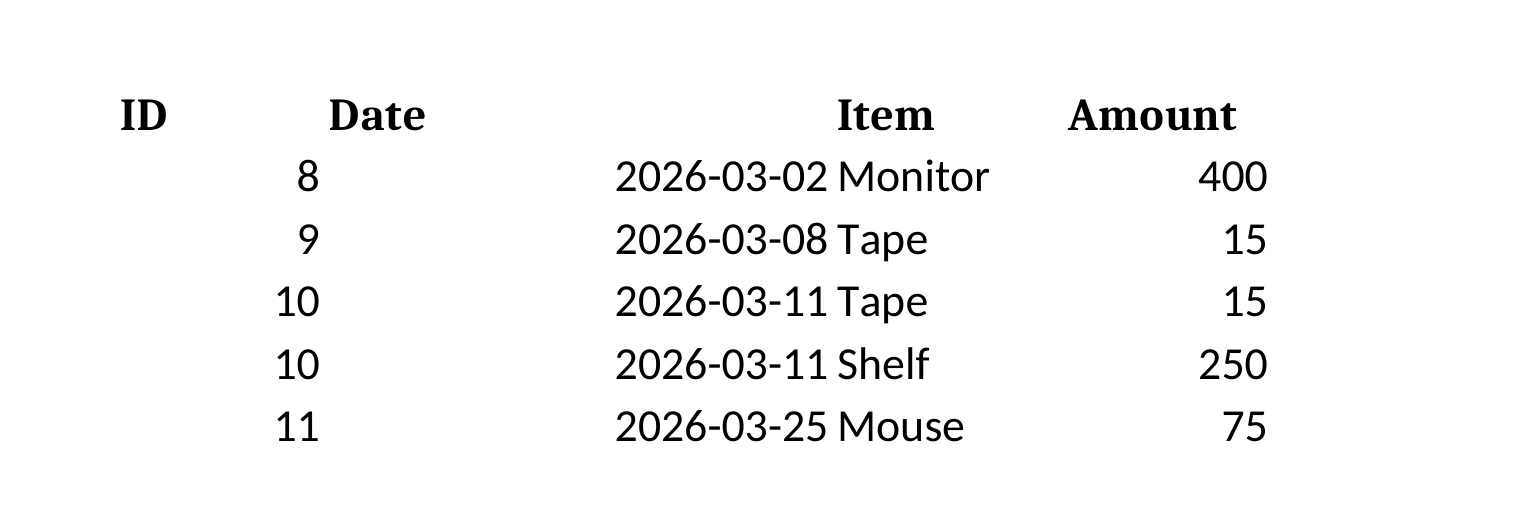
- Read the Mar sheet back and checked the workbook. The blank line in Jan was gone, and nothing was an exact duplicate. Mar still had ID 10 twice: Tape 15 and Shelf 250, same day, different items.
- Reported the totals and asked for the ruling. Jan 4 rows, 545.50; Feb 3 rows, 369.99; Mar 5 rows, 755.00. Dropping the Shelf row would take Mar to 505, so it kept both and asked whether to collapse one or mark the second.
- Offered to make the collision a standing check, so the next monthly batch reports a repeated key itself instead of relying on a person to notice.
What you get
- One workbook with a sheet per file: Jan, Feb and Mar, 12 rows in all.
- The blank row gone: the extra line in Jan was dropped, and the other sheets were checked for one.
- Real types: IDs and amounts are numbers, dates are dates, so the columns can be summed and sorted.
- A checked total for each sheet, read back from the file rather than assumed.
- The collision kept visible: Mar's two ID 10 rows are both in the sheet, with the 250 question stated, not buried in a first-wins dedupe.
What it took
| time | steps | tokens | images | |
|---|---|---|---|---|
| the workbook | 0.8 minutes | 7 | 150,819 read (125,398 cached), 3,527 written | none |
It ran on your plan's usage, like any job; Plans, usage & shared usage has what each plan includes.
Why it used little model work: the saved reflex did the row work as a program, and the model only read the files and checked the result.
Next time: the reflex was already there
The typed reflex was written earlier that afternoon, in a chat that found the built-in one turning every value into text. This run reused it: the folder, the output name and the dedupe key are the only inputs. A repeat of this job is a two-sentence request, not a rebuild.
How it's different
- It checks the data, not just the merge. It read the Mar sheet back and found that ID 10 was used twice with different items and amounts. A silent first-wins dedupe would have removed the 250 row from the quarter.
- Real types, not text. The built-in reflex wrote CSV strings through the grid, so dates were text and amounts could not be summed. The rewritten reflex coerces ints, decimals and dates and formats by column type.
- It reuses a program for the rows. Once the shape of the job is known, the reflex does the mechanical work; the model reads the files, checks the output and asks the one question that needs a person.
- It reads its own output. The sheet contents and the workbook state were read after the build, and the totals were checked against the rows.
How the grid, the formula engine and the built-in reflexes work: What can the Spreadsheets agent do, and how does it work?
Doing it yourself
- Open the agent switcher at the top of the sidebar and pick Specialists → Spreadsheets.
- Upload the files from Files (
.xlsx,.xls,.csv,.tsv). - Ask for one workbook, a sheet per file, blank rows gone and dedupe on the key column.
- Answer the collision question: keep both rows, collapse to the first or last, or mark the duplicate.
- Download the workbook with Download, or keep editing in the grid. Revert undoes the last turn.
Limits
- CSV files open read-only. The agent works on its copy; your original is untouched.
- A dedupe on a key assumes the key is unique. When one ID has different items or amounts, the agent should ask; check that it did.
- A reflex can keep the first duplicate silently. The built-in one does; the typed one takes the dedupe key as an input, and a collision mode is not built in yet.
- The grid shows the first 5,000 rows and 256 columns. Bigger files still work fully on disk.
- Pivots are values, not Excel PivotTables.
- Revert is one level, for the open file only.
Questions
Can AI merge Excel files and remove duplicates? Yes. Upload the files, ask for one workbook with a sheet each, and name the column to dedupe on. Irene builds the sheets and reports what it removed.
Does it remove every duplicate automatically? It removes exact duplicates. When the same ID carries different data, it stops and asks, because collapsing the rows can delete a real purchase. This run kept both ID 10 rows and said the difference was 250.
Will the numbers be real, or text? Real. The final workbook has integer IDs, decimal amounts and true dates, so the columns sum and sort; the agent had to rewrite its reflex to get that right.
Can it handle a year of monthly files? Yes. The reflex takes a folder, a maximum file count and an output name, so the same job repeats each month with new files. For a one-off, the agent can also drive the merge with Python.
Related
Updated