Manual›Jobs
How do I make a poster with AI?
Give the Design & Media agent the event, the date and the picture you want. It picks an image model, writes a photographic brief, lays the poster out on a design system at 1080 × 1350, renders it and looks at the result before showing you, then fixes the sizes and contrast until the title holds at thumbnail size. The Saltwater Sessions jazz poster below took 12 minutes, and the golden-hour relight it asked for took 7.2 more.
A real run: a jazz night on the shoreline
A run on our machine, 24 September 2026, on DeepSeek V4.1 Flash.
This was the whole request:
make a poster for a summer jazz night on the beach, "Saltwater Sessions, Aug 30", with a photo of a saxophone player at the shoreline
A design system was already on the canvas, so it did not start from nothing: it read that system and built the gig inside the club's existing brand, as a night presented by the swimming club.
Before building, it asked one question about the details band. Its own line on why: "A gig poster needs doors, place and line-up; I won't invent them." The answer was to invent them, since this was a test of the studio, so it made up a venue, two bands and a ticket line — and named them as invented when it handed the poster over.
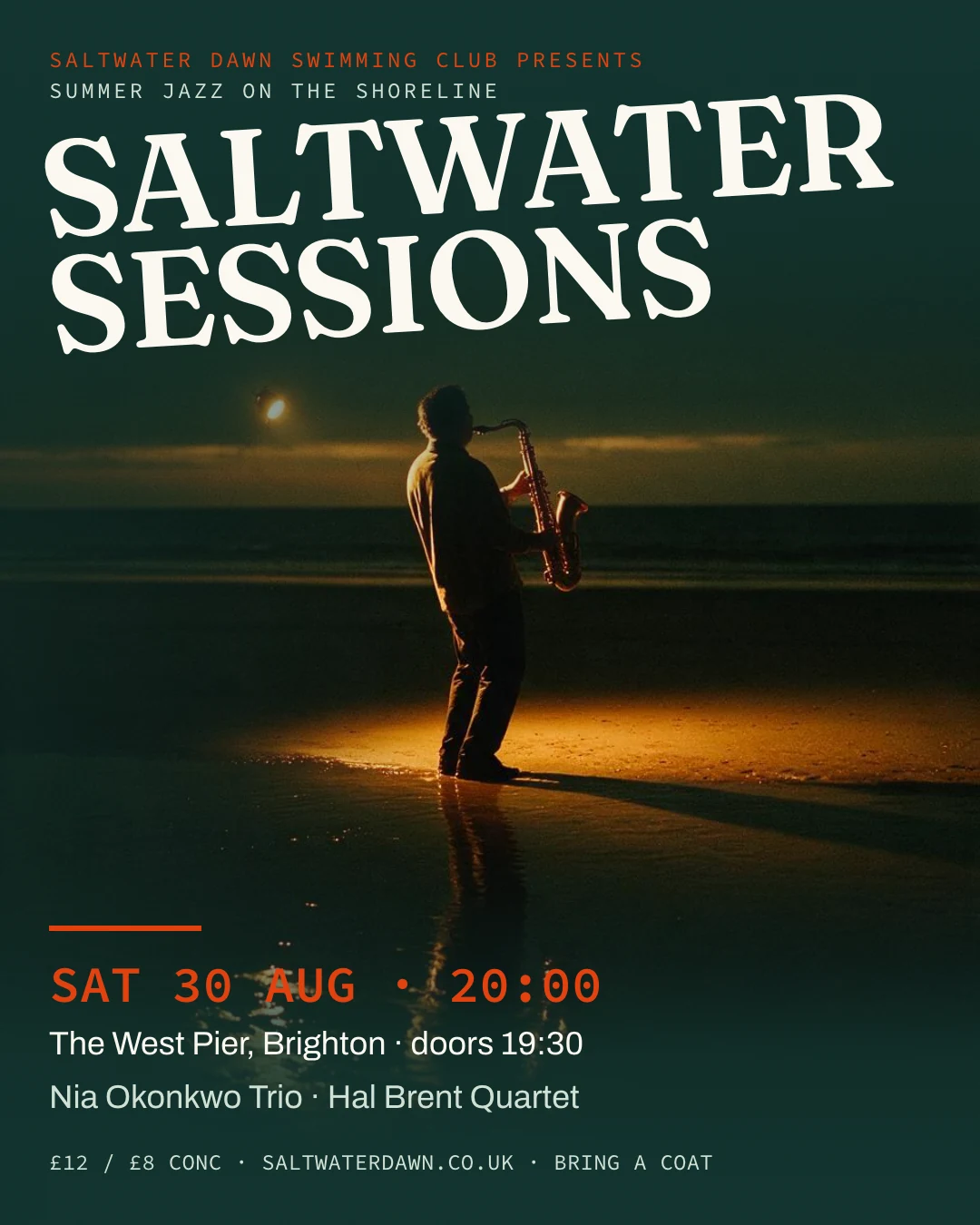
1 · The poster. A dark night plate, the title in Fraunces uppercase leaning −3.4°, the date in orange mono, and the picture owning everything below the type.
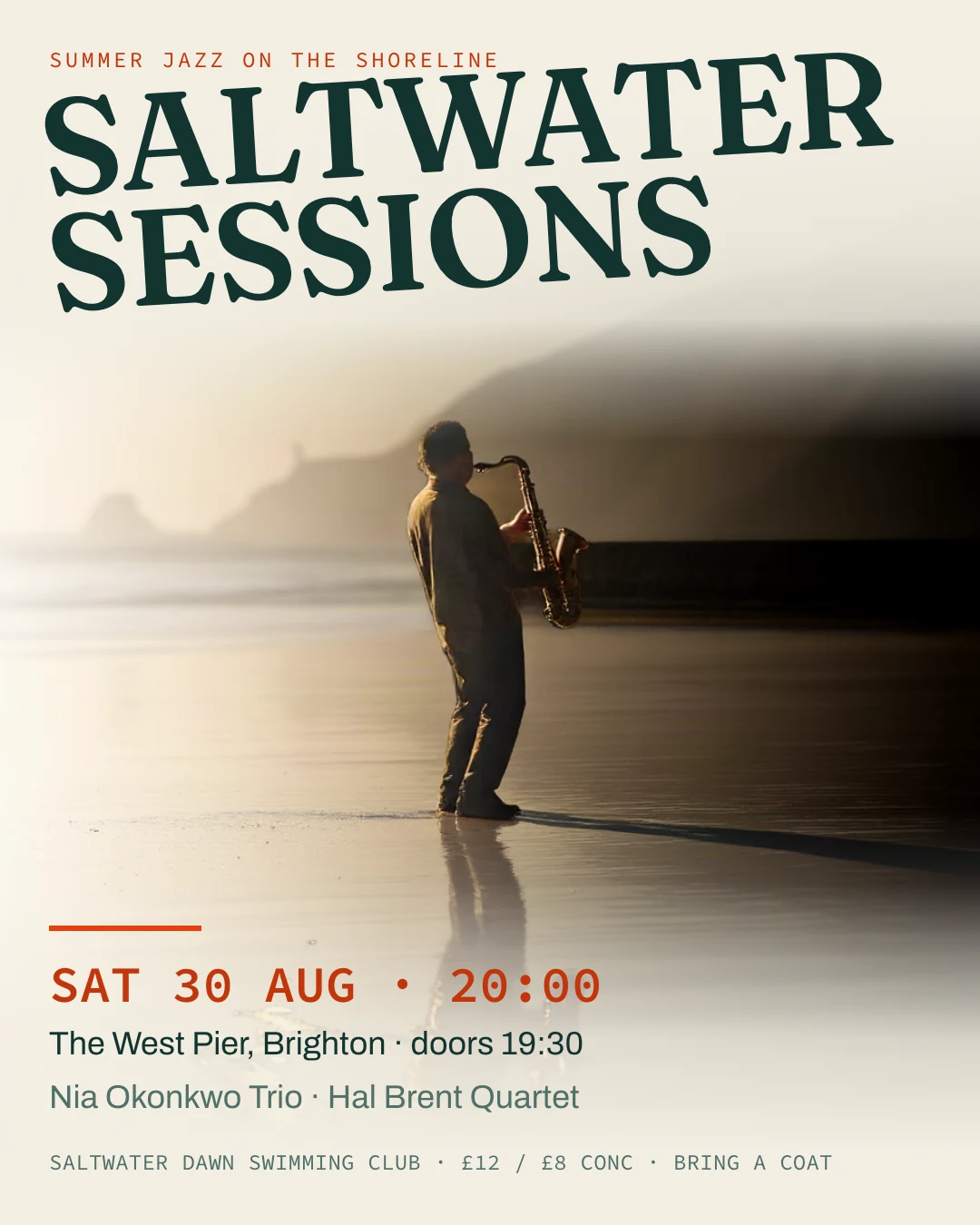
2 · The relight. The next day: "relight this as golden hour, light from the left, and put it in the poster." It compared the relight models, chose the one that can name a side, and relit the photo. Then it rebuilt the poster's whole tonal treatment around the new picture, because white type on a pale gold sky cannot be read.
What the Design & Media agent did
- Read the brand before it drew anything. The canvas held the Saltwater Dawn design system from an earlier piece, so the poster was built from those tokens: the palette, Fraunces for display, Source Code Pro for every numeral, and the tilted-title rule from the system's design DNA.
- Asked the one thing it could not know. A gig poster needs doors, place and lineup. It offered marked placeholders, a pinned date, or the details typed in, with "I won't invent them" as the reason — then used sample details when told to.
- Chose the image model and wrote the brief. It searched text-to-image models, compared one and picked it for a photographic look. The prompt composed the frame for type: vertical, the saxophonist three-quarter from behind and mid-phrase in the middle third, the upper third empty near-black sky with a low horizon.
- Took the service's answer and reshot. It asked for a 4:5 crop, which the image service does not accept — it lists 1:1, 16:9, 9:16, 4:3, 3:4, 3:2 and 2:3 — so it resent the same brief at 3:4.
- Built the poster on the system, inverted for night. Deep sea-green ground, one hot accent doing three jobs — the top slug, the rule and the date — with the title's baseline stopping just short of the saxophonist's head so the photograph owns everything below it. Type sizes are a poster ladder in pixels, not web tokens.
- Looked, and fixed three real faults. The first render clipped the R off "SALTWATER" at the right edge, set the subtitle on the horizon afterglow where it lost contrast, and wrapped the fine print onto two lines. All three were fixed, and the title was pulled in twice (172px, then 156, then 150) until the margin was comfortable.
- Checked it the way a poster is seen. It cropped the render at full resolution to inspect the sky for banding, and again at quarter size to confirm the title and date still land from across a room. No banding; the layout held.
- Re-tuned the whole poster for the new light, rather than dropping the photo in. White type on pale gold would have been invisible, so it reversed the treatment to the system's other named move — ink on warm paper with one spot colour. The scrims went from ink to cloud, the title and details went to the deep green, the date moved to the darker accent, the eyebrow collapsed from two lines to one to clear the figure's head, and the photo took a light contrast and saturation lift.
- Said what the relight broke. The relight model preserved the figure, pose, horn and light from the left, and replaced the background: the wide flat beach became a cove with a headland and a rock stack. It reported that as a fault in plain words, said this was the weaker of the two posters, and named the model it would use instead for the backdrop-safe version.
What you get
- A poster at 1080 × 1350, rendered at true size, as a screen on the canvas and as a PNG asset.
- The layout as a live screen, so a headline or date can be changed and re-rendered without rebuilding the design.
- The photo both ways: the generated night plate and the relit golden one, so you can choose.
- Sample details named as sample, not quietly passed off as real.
- An honest note on the second version — what improved, what the model changed that you did not ask for, and what it would do differently.
What it took
| time | steps | tokens | images | |
|---|---|---|---|---|
| the poster | 12.0 minutes | 40 | not recorded | 1 generated |
| the golden-hour relight | 7.2 minutes | 24 | not recorded | 1 relit |
| the whole job | two runs, 19.2 minutes | 64 | not recorded | 2 |
These runs predate the usage log, so time is the session clock and the token column is empty.
It ran on your plan's usage, like any job; Plans, usage & shared usage has what each plan includes.
Why it looks at the render, not the code: a poster is judged at arm's length and at thumbnail size, and a model writing HTML cannot see that the R is clipped or that the subtitle has slid onto a bright horizon. Rendering, reading the picture, and checking a quarter-size copy are what caught all three.
How it's different
- It builds inside a brand, not a template. The poster inherits the design system already on the canvas; change a colour role later and the piece re-tints with no model call.
- The picture is art-directed for the layout. The brief asked for an empty upper third and a low horizon, because the title needs that sky — not a generic photo cropped afterwards.
- It checks how the piece will actually be seen. Full resolution for banding, quarter size for legibility. The title size changed twice on that evidence.
- A new picture is a redesign, not a swap. When the light changed, the type turned from white to ink, the scrims turned from ink to cloud, and the date colour changed so the poster still read.
- It reports its own failures. The background replacement, the weaker result, the model it would use next: all said plainly, with the night plate left untouched in case you want to go back.
- It marks what it invented. The venue, the two bands and the ticket line are named as sample, and it says why they were invented at all.
How the canvas, the formats and the media tools work: What can the Design & Media agent do, and how does it work?
Doing it yourself
- Open the agent switcher at the top of the sidebar and pick Specialists → Design & Media.
- Ask for the piece and the format: "a poster at 1080 × 1350 for a jazz night on the beach", with the name, the date and the picture you want.
- Answer the one question about the details band. Placeholders are fine; so is saying "make up sample details and mark them sample".
- Look at the render. Ask for changes on the card you mean — the title size, the crop, the date colour.
- To change the picture, ask for it directly: "relight it as golden hour, light from the left, and put it in the poster". Expect the layout to be re-tuned around it, not just swapped.
- Download the PNG from the card, or select several screens for one PDF.
Limits
- 1080 × 1350 is a social poster. An A3 print file is a different aspect ratio, so it is redrawn at that size with bleed and crop marks, not scaled up; ask for it as a separate piece.
- A relight can change more than the light. The model here preserved the figure and replaced the backdrop — a wide beach became a cove with a headland. Check the background, not just the subject, and ask for a backdrop-safe model if the place matters.
- A model that takes a side is rare. Of the relight models compared, only one could name which side the light comes from; the other offers "side" and picks the side itself.
- Generated photos are not real places. The venue line here was invented for a test, and the photo does not show the West Pier.
- Every invented detail is yours to replace. Sample doors, lineup and prices are named as sample when the poster is handed over; swap them before printing.
- Check dates it adds. The request said only "Aug 30"; the agent added "SAT" itself, and 30 August 2026 is a Sunday. Check any weekday or date a design adds before it prints.
- Type over a photo needs a treatment that suits it. A dark-on-light poster needs a light scrim and ink type; the layout that worked for the night plate had to be re-tinted for the golden one.
Questions
How do I make a poster with AI? Ask the Design & Media agent for a poster, name the event and the date, and say what the picture should show. It writes the image brief, lays the poster out on a design system at 1080 × 1350, renders it, and fixes what it sees before handing it over.
Can it use a photo I already have? Yes. Give it the file and say what you want changed — the light, the crop, the frame. It edits the photo rather than generating a new one, and tells you anything the model changed that you did not ask for.
How do I make it look like golden hour? Ask for the relight and name the direction: "golden hour, light from the left". The light lands on the side you name, with the rim on the face, shoulder and forearm and a long shadow to the other side. Check the background afterwards.
Can I change the date or the lineup later? Yes. The poster is a live screen on the canvas, so the text is editable and re-renders without a new image.
Can I get a print-ready file? Yes, as a separate piece: an A3 or A4 PDF with bleed, crop marks and 300 dpi at that ratio. It is redrawn rather than scaled, because a poster scaled up loses its type sizes.
How does it use my plan? The layout runs on your plan's usage, like any job; generated and relit images use your plan's image allowance first, and the local render and exports use no model. Plans, usage & shared usage has what each plan includes.
Related
Updated